

The iDetail Bulk Metrics Export version 2 uses a custom URL unique to the organization to provide raw information about iDetail app sessions and events. With the Bulk Metrics Export:
You can select specific apps or all apps within an organization
You can specify which data columns are included in the export and their order. For a complete list, see What data does the bulk metrics export retrieve (data columns)?
You can set a specific date and time range for your query with the start_date and end_date parameters, or you can choose the yesterday parameter to retrieve only the previous day’s data
You can use your local time zone for the query and results
Data Format
The default format for separating values in the Bulk Metrics Export is comma-separated values (CSV).
Retrieval
The URL below is an example of the parameters retrieved by the Bulk Metrics Export query. This format could be used for a reoccuring routine that you would program to run daily on your server to capture the prior day’s use data.
URL format:

An example of how this URL might be implemented appears below:
Example URL:

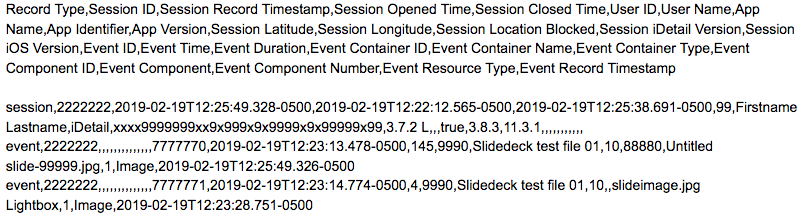
Sample Data:
The first row of data returned is a header label, followed by data records.
Parameters to modify the output
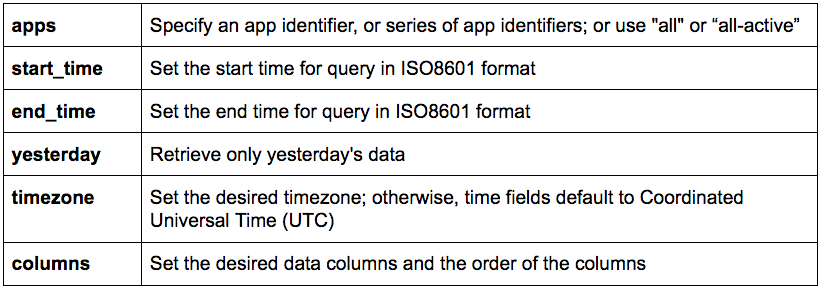
The following parameters are available for shaping your organization’s bulk metrics query:
For more information
For more details about specific aspects of setting up and running the Bulk Metrics Export query, see the Related Articles below.
Click here to read more about Coordinated Universal Time (UTC).