

The bulk metrics export has a timezone parameter that can be included in the URL query.
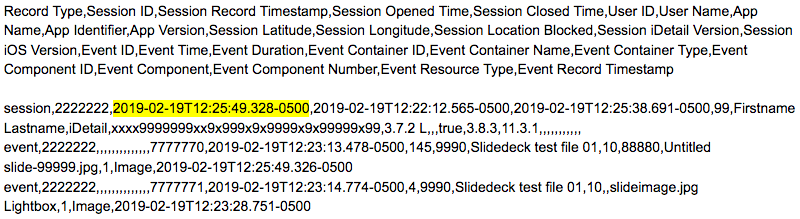
In the Example URL below, the timezone parameter is set to “America/New_York”. The equivalent “-0500” offset for New York is also accepted as a value. In the Sample Data below, all time values show the -0500 offset for the New York time zone.
Example URL:

Sample Data:
The first row of data returned is a header label, followed by data records.
If the timezone parameter is not set, all times are expressed as Coordinated Universal Time (UTC) values. Read more about UTC.
For a complete list of time zone names and offsets, see the Wikipedia List of tz database time zones.